Countdown - Days Until
- 4.7
- Rating
- 1.00M
- Installs
- Free
- Price
 Analysis by App-foxy
I like countdown apps when they do more than turn a date into a number. A useful one should help me remember why an event matters, make the information easy to see, and stay out of the way until I need it. Countdown - Days Until, developed by Days Until LTD, takes that focused approach. It is a lifestyle app for tracking birthdays, holidays, trips, appointments, launches, and other moments that are easier to anticipate when they are visible.
My overall view is positive: this is a polished choice for people who want a dedicated countdown rather than another crowded calendar. Its strongest qualities are the visual presentation, home-screen widgets, and reminders that make future events feel more immediate. It is free to start, rated for Everyone, and available on Android devices running version 8.0 or later. The app has reached over a million installs and holds a 4.7 average from around seventeen thousand ratings, which fits my impression that it is simple to understand and broadly appealing.
Why this countdown app feels more useful than a date calculator
The first thing that works well is the basic idea of separating “what is happening” from “when it happens.” A normal calendar is excellent for schedules, recurring commitments, and detailed appointments, but it often makes an important future occasion compete with everything else. Here, the event itself becomes the main object. That makes the app particularly comfortable for birthdays, vacations, festivals, exams, moving days, and personal milestones.
You May Also Like

 Blood Strike: 2.5 Anniversary
Blood Strike’s Loadouts Turn Every Drop Into a Tactical Gamble
A close look at Blood Strike’s custom loadouts: how fast access to signature weapons reshapes its battle royale rhythm, rewards preparation, and narrows the gap between fights.

 Pandora - Music & Podcasts
Pandora’s Music Is Easy to Start, but Harder to Recover
Pandora’s strength is its low-effort path from a seed to a station. Its weak spot is how much confidence it asks you to place in connection, setup, and quiet recovery.

 8 Ball Pool
 Is Built on Rivalries, Rematches, and Routine
A close look at the rivalries, rematches, shared routines, and unanswered safety questions that turn a quick pool match into a persistent mobile community.

 Samsung Music
’s Quiet Strength Is Playing What You Already Own
Its reach comes less from spectacle than from dependable access to a personal library. That simplicity is both the app’s strongest retention engine and its ceiling.

 AccuWeather: Weather Radar
AccuWeather Review: A Quick, Clear Forecast for Everyday Decisions
For everyday plans, the best forecast is the one you can understand quickly. AccuWeather makes rain timing, radar, and local conditions easy to act on, with a few trade-offs.

 Hill Climb Racing
Why Hill Climb Racing Still Turns Crashes Into One More Run
A tiny car, a bumpy hill and one more upgrade: Hill Climb Racing keeps resurfacing because its simple chaos makes every near-miss feel personal.
More From Our News Desk



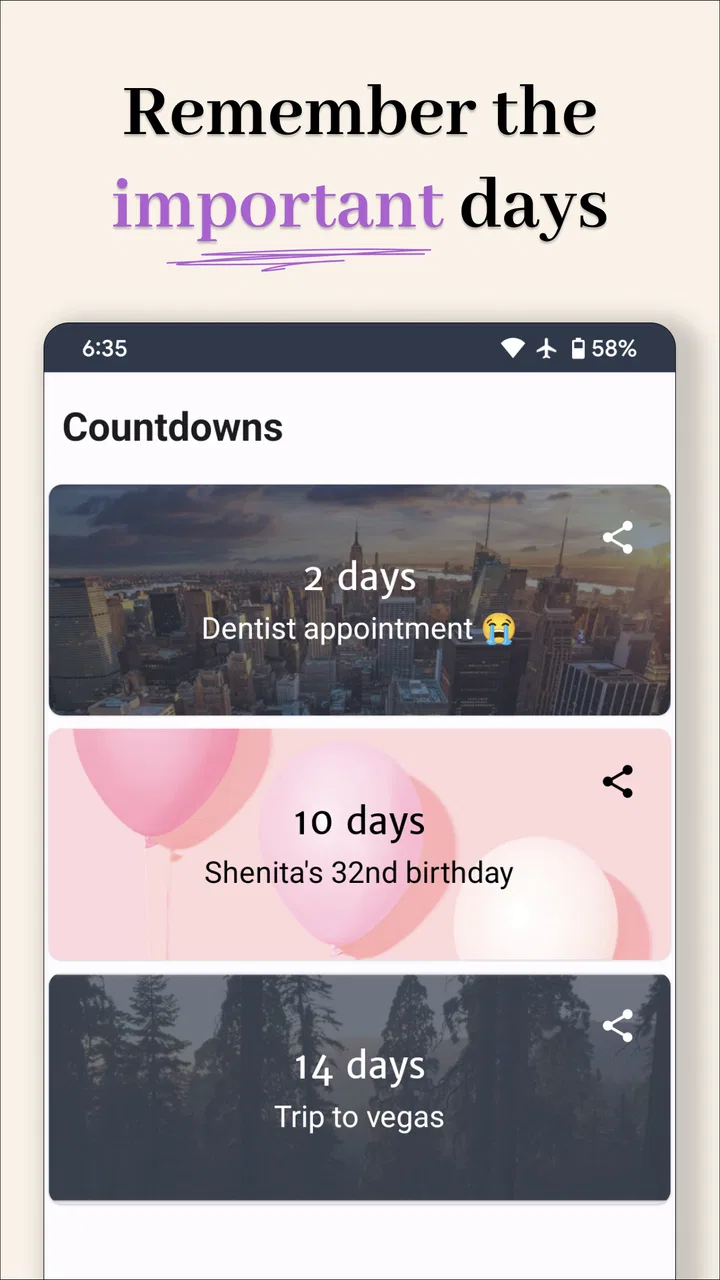
I found the visual side more important than I expected. A plain number can be useful, but a countdown becomes something I am more likely to check when it has a clear, attractive presentation. The store summary highlights beautiful widgets, and that is a meaningful part of the experience rather than a minor decoration. A widget lets an event remain visible on the home screen, so I do not have to remember to open the app just to see how close it is.
That changes the way I would use it. Instead of creating a long list and forgetting about it, I would keep only the few events that deserve attention in a prominent place. For example, before a family trip, I might put the departure countdown on my home screen, while leaving less urgent dates inside the app. This creates a useful distinction between events I want to monitor daily and events I only need to remember occasionally.
The practical value of widgets and reminders
Widgets are most helpful when the countdown is part of a routine. A person planning a wedding, preparing for a school deadline, or waiting for a long-planned holiday can glance at the phone and immediately understand the remaining time. That is less effort than opening a calendar, finding the right month, and interpreting an entry among several others.
Smart reminders add another layer. I would not use a countdown as a replacement for a detailed task manager, but a reminder connected to an upcoming date can prevent the common mistake of remembering the event only when it is almost too late. For a birthday, the useful moment may be several days beforehand, when there is still time to choose a gift. For a trip, the reminder is more valuable when it prompts preparation rather than simply announcing that the trip is tomorrow.
A good workflow is to create the event early, choose a reminder that matches the amount of preparation it needs, and then use the widget only for the most important countdown. That avoids turning the home screen into a wall of numbers. The app is at its best when it supports anticipation without creating another stream of notifications to dismiss.
Everyday scenario: turning a future event into a manageable plan
Imagine I am arranging a weekend away with friends. The calendar can hold the actual travel details, while this app handles the emotional and practical countdown to the trip. I could add the departure date, place the countdown where I will see it, and use a reminder to start checking luggage, transport, or reservations at a sensible point. The app would not replace the booking confirmations or a packing list, but it would give the whole plan a visible focal point.
The same approach works for a birthday. I could create the date once, keep it available for future reference, and set a reminder early enough to buy a present or arrange a message. This is a subtle strength: the app encourages me to treat a date as an event worth preparing for, not merely as a line buried in a calendar.
For holidays, the countdown is more about motivation than organization. Seeing the remaining time can make a long wait feel tangible. For work or study deadlines, however, I would pair it with a proper task app. The countdown tells me when the deadline arrives; it does not, by itself, break the work into steps.
Where it compares well with calendars and other alternatives
Compared with a standard calendar, Countdown - Days Until is more focused and more visual. A calendar is the better tool when I need time slots, meeting details, shared schedules, repeating appointments, or a full overview of a busy week. This app is better when the question is simply, “How long until this one meaningful date?”
Compared with a notes app, it offers a clearer sense of time passing. A note can store the event name and details, but it does not naturally keep the remaining days in front of me. Compared with a task manager, it is lighter and less demanding. That is an advantage for birthdays and holidays, but a limitation for projects that need checklists, dependencies, or progress tracking.
There is also a psychological difference from using a website or a quick search. A web-based countdown is fine for a one-off occasion, but it is not as convenient for a collection of personal events. A dedicated app can keep those moments together and make them part of the phone experience through widgets and reminders. I would choose this app when the event deserves ongoing visibility, not when I only need to calculate the time between two dates once.
What I would watch out for before relying on it
The focused design also creates the main limitation. A countdown is not the same thing as a complete planning system. If I need rich event descriptions, shared editing, detailed location information, attachments, or a sequence of tasks, I would still use a calendar or planning app alongside it. Countdown - Days Until works best as a companion, not as the single place for every kind of organization.
There is a risk of overloading the experience with too many events. When every birthday, holiday, appointment, deadline, and minor occasion appears as a countdown, the visual impact becomes weaker. The most effective setup is selective. I would keep the home-screen widget for one or two events and use the app’s broader list for everything else. That is not a flaw unique to this product, but it matters because the app’s appeal depends heavily on clarity.
Notifications also require judgment. Reminders are useful only when they arrive at a meaningful time. A reminder for an event that needs no preparation may become background noise, while a reminder set too close to a major occasion may be practically useless. I would treat the reminder feature as a planning aid and adjust it according to the event rather than accepting one pattern for everything.
The free entry point makes the app easy to try, but in-app purchases range from $0.99 to $35.99 per item. That is worth considering before building a setup around options that may require payment. I would begin with the free experience, decide whether the main countdown and widget workflow fits my habits, and only then consider optional purchases. The price range means users should pay attention to the purchase screen instead of assuming every visual or convenience feature is included.
The current version is 3.0.960, and the app has been available since July 9, 2018. That gives it a mature presence compared with a brand-new utility, but I would still keep expectations realistic: an app like this is about dependable everyday convenience, not a large productivity platform. Its value comes from how naturally it fits into a routine.
Who will get the most from it
I would recommend it first to people who enjoy visual reminders and have a handful of dates they genuinely look forward to. Families can use it for birthdays and holidays. Travelers can keep a trip visible. Students can monitor an important deadline while using another tool for assignments. Couples and friends may enjoy tracking personal milestones or shared plans. Anyone who finds a normal calendar too formal for anticipation may appreciate the lighter tone.
It is also a good match for users who want a low-friction app. The purpose is immediately clear, and there is no need to learn a complicated project system before getting value from it. The combination of a countdown, a widget, and a reminder covers the central use case without asking me to maintain a large database of information.
I would be more cautious about recommending it to someone who wants a full shared family calendar, a detailed project manager, or a serious deadline system. Those users will probably be better served by tools built around collaboration, tasks, and event details. I would also hesitate if a person dislikes persistent visual prompts; the very feature that makes the app motivating for one user may feel distracting to another.
Small workflow improvements that make a real difference
My first tip is to name events in a way that explains the purpose, not just the occasion. “Trip” is less useful than “Weekend in Lisbon,” while “Birthday” may be less immediately recognizable than the person’s name. A clear label makes the widget useful at a glance and reduces the need to open the app for context.
My second tip is to separate emotional countdowns from operational reminders. I might want to see the days until a holiday every morning, but I may only need one reminder to buy supplies. Keeping those roles distinct prevents the countdown from becoming a substitute for preparation and prevents reminders from becoming excessive.
My third tip is to review the list after a major event passes. A finished countdown can lose its purpose, and a crowded list makes the active events harder to notice. Removing or reorganizing old entries keeps the app’s main strength—immediate visual focus—intact. This is especially important for users who add many seasonal events.
A fourth useful trade-off is to choose visibility according to importance. The widget should represent the event I most want to remember, not necessarily the event that is closest. A date happening soon may need a reminder, while a distant holiday may deserve the widget because it provides ongoing motivation. Thinking in those terms makes the app feel more intentional.
My final recommendation
After using it as a dedicated date tracker, I see Countdown - Days Until as a strong, approachable lifestyle utility rather than a replacement for a calendar. Its best evidence is practical: the app turns selected future events into visible, attractive reminders, and the widget makes that information available without an extra search. The high user rating and broad install base suggest that this focused idea works for many people, but the real test is whether you have dates you want to keep emotionally and practically close.
I would install it if I wanted a cleaner way to follow birthdays, holidays, trips, or milestones. I would skip it if I needed shared scheduling, detailed task management, or a complete event-planning workspace. The free starting point makes trying it straightforward, while the optional purchase range means I would evaluate paid extras carefully rather than assuming they are necessary.
For me, the app succeeds because it does not pretend that every organizational problem needs a complicated system. It gives important dates a dedicated place, adds useful visibility through widgets, and supports preparation with reminders. Used selectively, it can make future events easier to remember and more enjoyable to anticipate. Its clearest strength is focused anticipation; its clearest boundary is that anticipation is not the same as full planning.
FAQs for Countdown - Days Until
01What is Countdown - Days Until used for?
Countdown - Days Until is designed to help you track the time remaining until important events, dates, and personal milestones. You can create countdowns for birthdays, holidays, vacations, weddings, exams, appointments, launches, or any other occasion. The app presents the remaining days in a clear format, making it easy to remember upcoming events and stay motivated while waiting for them.
02Can I create multiple countdowns in Countdown - Days Until?
Yes, the app is intended for managing more than one upcoming event at the same time. You can typically create separate countdowns for different occasions, give each one a recognizable title, and organize them according to your preferences. This is useful if you want to track a vacation, a birthday, and an important deadline without having to calculate the remaining time manually.
03Does Countdown - Days Until provide notifications or reminders?
Countdown - Days Until may offer reminders or notifications depending on the version of the app and the permissions enabled on your device. These alerts can help you remember that an event is approaching or notify you when the countdown reaches its final day. Before relying on the app for an important deadline, check its notification settings and allow the required system permissions.
04Can I customize the appearance of my countdowns?
The app focuses on making upcoming events visually easy to recognize, and customization options may include titles, dates, colors, backgrounds, or other display preferences depending on the platform and current release. These features let you personalize countdowns for different occasions. Some visual options may be limited or available only through specific app settings, so the exact choices can vary.
05Is Countdown - Days Until free to download and use?
Countdown - Days Until may be available as a free download, but the overall experience can include advertising, optional purchases, or premium features depending on the Android or iOS version. Before downloading, review the store listing for the current pricing and subscription details. Also check the app’s privacy information and permissions so you understand what using the free version involves.
Pros
- Simple countdown setup with clear date and time controls.
- Useful for birthdays
- holidays
- trips
- exams
- and other milestones.
- Clean interface makes remaining days easy to check at a glance.
- Supports multiple countdowns for tracking several upcoming events.
- Helpful reminders can keep important dates from being forgotten.
Cons
- Some advanced customization options may require a paid upgrade.
- Ads can interrupt the experience in the free version.
- Limited value if you only need to track one occasional event.
- Countdown accuracy depends on correct time zone and device settings.
- Privacy details should be checked before enabling notification permissions.

Countdown - Days Until
Gallery